Compatibility
Minecraft: Java Edition
Platforms
Supported environments


Links
Creators

Details
simplemusic
This is a so~~~~~ simple music play mod that supports mp3 and midi, as well as displaying lyrics.
How to use
Remember to install the depends mod Fabric Language Kotlin or Kotlin for Forge
Open the music folder in the game directory, and then you will find the midi and mp3 folders. Just put your midi files or mp3 files into the corresponding folders.
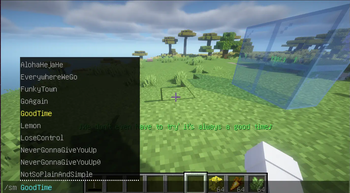
After entering the game, enter the /simplemusic or sm command + the music name to play it.
If you want to stop playing music, enter /simplemusic stop or /sm stop
If there is a problem with the lyrics display, just stop playing.
Settings
This mod have no config file or pages. It's just some simple commands or shortcuts. You can use 3 shortcuts to plus or minus volume,and switch lyrics' color.
The shortcuts are equal to /simplemusicsettings or /sms command!
Lyrics display
Just put the .lrc file and the music together (the file names must be the same). If lyrics are found when playing music, they will be displayed at the bottom of the screen. The file format is roughly as follows (just like most of .lrc files you found in Internet.):
[00:00.000] 作词 : 米津玄師
[00:01.03] 作曲 : 米津玄師
[00:19]あの日見渡した渚を
[00:24]今も思い出すんだ
It looks like: